Tag: wordpress

  • 7 Best Auction Plugins for WordPress in 2023

    eBay and similar auction sites have transformed online buying and selling. Bidding and winning can be thrilling. Luckily, if you want to add auctions to your WordPress website, there are many plugins to choose from. Whether you want to cross-promote eBay items or create a full auction site to market your products, our team has researched and selected the best WordPress auction plugins for you.

    Let’s dive in.

    What is an Auction Plugin for WordPress?

    Auction plugins simplify the process of selling products through a bidding format. These plugins offer a plethora of features and tools that make it effortless to create and manage auctions, such as setting up auction rules, accepting bids, displaying auction listings, customizing WooCommerce products, and managing payments. Some also allow listings from eBay. Standalone and WooCommerce-dependent options exist, with the latter being easier if you already use WooCommerce.

    7 Best WordPress Auction Plugins

    When researching auction plugins, we took into account some important factors. First, we evaluated how user-friendly the plugin is. Secondly, we checked the frequency of updates, compatibility with the latest version of WordPress, number of features, and reviews. So without further delay, let’s take a look at our list of the best WordPress auction plugins.

    1. YITH WooCommerce Auctions

    YITH Auctions for WooCommerce plugin

    YITH WooCommerce Auctions is a top WordPress auction plugin that seamlessly integrates with WooCommerce, allowing you to add auctions to your existing store. It also works well with other essential YITH products such as YITH WooCommerce Multi-Vendor for multi-vendor sites. With various bidding options and reserve prices, you can ensure your products sell for the desired price. Detailed auction activity reports provide insights into product performance, and the pay-to-play option weeds out non-serious bidders, increasing auction profitability.

    Key Features for YITH WooCommerce Auctions:

    • Seamless integration with WooCommerce
    • Wide range of bidding options
    • Set reserve prices
    • Comprehensive dashboard with detailed reporting
    • Sealed bidding
    • Works with other YITH WooCommerce plugins

    Yith auction settings

    YITH WooCommerce Auctions offers unique features such as the ability to include additional product details in listings, giving bidders more information. Sealing bidding, ideal for fundraising or anonymous auctions, hides the highest bidder’s identity until the auction ends, increasing excitement and competitiveness.

    Best For:

    For WooCommerce users seeking a data-driven auction site, YITH WooCommerce Auctions is an excellent choice, perfect for fundraising or an eBay-style e-commerce solution. However, at $150 per year, it may be too costly for some. That being said, customizing a free WooCommerce store can be an expensive endeavor. A more affordable option is Ultimate WordPress Auction, which provides the same functionality for half the cost.

    Pricing: $149.99 per year

    Get YITH WooCommerce Auctions

    2. Dokan Simple Auctions

    Dokan Simple Auctions plugin

    For an e-commerce multi-vendor marketplace, check out the Dokan Simple Auctions add-on, which works with the Dokan core plugin. Vendors can create their own stores and sell products while you earn a commission. You’ll need WooCommerce, WooCommerce Simple Auctions, and Dokan Pro, but it’s worth it for a full-featured online marketplace.

    Dokan product listing

    Dokan Simple Auctions also offer bidder features like product watching, wishlisting, and vendor following. Plus, it includes order tracking, and social media sharing, which is essential when wanting to implement social commerce.

    Key Features for Dokan Simple Auctions:

    • Create a multi-vendor marketplace with auction functionality
    • Give users the ability to watch and wishlist products
    • Share products on social media
    • Ability to follow favorite vendors
    • Order tracking

    Dokan Simple Auctions is a top choice for multi-vendor e-commerce sites, thanks to its integration with Dokan, which offers the most payment gateways and vendor management features. Built on WooCommerce, Dokan comes in multiple languages and has useful features such as coupon creation, multiple commission types, and product advertising.

    Best For:

    Dokan Simple Auctions is a great option for those building a multi-vendor auction website with WooCommerce. While the plugin itself is affordable at $49 per year, upgrading to the required Dokan Pro costs $249 per year. If you’re serious about your business, the investment may be worth it. But if you don’t need WooCommerce or a multi-vendor platform, WP Auctions is a more cost-effective option.

    Pricing: $49 per year.

    Get Dokan Simple Auctions

    3. WooCommerce Simple Auctions

    WooCommerce Simple Auctions plugin

    WooCommerce Simple Auctions is an affordable plugin that offers common auction features such as reverse bidding, various auction types, bid increments, and reserve price. Its unique auto-bidding feature allows bidders to set a maximum bid range and the plugin will automatically raise their bid. The plugin also lets you monetize your website by allowing user-submitted products and charging fees. It includes enticing widgets for different auctions and credit card verification to ensure bidders are legitimate.

    Key Features for WooCommerce Simple Auctions:

    • Credit card verification before bidding
    • Various auction widgets to entice bidding
    • Auto-bidding feature
    • Integrates with WooCommerce
    • Compatible with the Dokan multi-vendor plugin

    WooCommerce Simple Auction settings

    WooCommerce Simple Auctions also allows you to share upcoming auctions and embed shortcodes throughout your site to promote specific products and generate interest.

    Best For:

    If you’re looking to create a simple auction site, WooCommerce Simple Auctions is an excellent option to consider. What’s more, the plugin can integrate with the Dokan multi-vendor marketplace plugin, enabling you to build auction sites that can handle multiple stores on one website. Alternatively, if you’re only looking for a solution to feature your eBay listings on a WordPress site, consider the free plugin, Auction Nudge, which is featured a little later in this post.

    Pricing: $49 per year

    Get WooCommerce Simple Auctions

    4. WP Auctions

    WP Auctions plugin

    Moving on to another great plugin, WP Auctions is a standalone auction plugin that doesn’t require WooCommerce. It offers four different bidding engines that enable you to create simple auctions, as well as proxy, reverse, and quick bidding.

    WP Auctions sets itself apart from other auction plugins by offering the unique feature of sending 2nd chance offers to the next highest bidder, which helps avoid losing a sale and provides added convenience and protection. Additionally, it supports Ajax and allows for the re-listing of closed or unsold auction items. However, it is limited in its payment gateway options, only supporting PayPal and checking accounts, which may not work for those requiring multiple payment options.

    Key Features for WP Auctions:

    • Second change offer capability
    • Re-list closed or unsold auctions
    • Real-time bidding with Ajax
    • Functions without WooCommerce
    • 4 bidding engines
    • Easy auction creation editor

    WP Auctions text editor

    As previously highlighted, WP Auctions stands out from other plugins because it doesn’t require the use of WooCommerce. While WooCommerce can be challenging to navigate, WP Auctions simplifies auction creation and management through its intuitive and user-friendly text editor, which is much easier to navigate. This approach streamlines the process and makes it more accessible to a broader range of users.

    Best For:

    If you are seeking a straightforward alternative to WooCommerce for your auction website, WP Auctions is an excellent option. However, it’s worth noting that the plugin only supports a limited number of payment gateways. If you require a more versatile solution, you may want to consider Ultimate WordPress Auctions, which is based on WooCommerce and offers more payment gateway options.

    Pricing: $39 one-time fee

    Get WP Auctions

    5. Ultimate WordPress Auction

    Ultimate WordPress Auction plugin

    The next plugin on our list, Ultimate WordPress auctions, is designed to work with WooCommerce and offers standard auction formats such as reverse price and buy it now. It also has unique features such as built-in Twilio support for SMS notifications to bidders when they’re outbid or when an auction is ending, and the ability to automatically relist unsold auctions.

    Ultimate WordPress Auctions supports virtual products and extensive filtering capabilities, including a lightbox feature and a private messaging system. That being said, a pro license is required for more advanced features such as automatic proxy bidding, automatic re-listing, and silent bidding.

    Ulimate Auction Pro private messaging

    Key Features for Ultimate WordPress Auction:

    • Private messaging system
    • Virtual product support
    • Advanced filtering options
    • Lightbox feature for the product gallery
    • SMS alerts to bidders
    • Automatic re-listing

    Overall, Ultimate WordPress Auction is comparable to other plugins on our list. The free version offers basic features such as an auction feed page, a comments section, and private messaging. The pro version provides more advanced features, including automatic debit payments and user registration with credit card or stripe integration.

    Best For:

    Ultimate WordPress Auction is suitable for those looking to create a no-frills auction site. While you can get by with the free version, you’ll want to upgrade to at least the business plan to take advantage of the SMS notification feature, as well as the ability to collect automatic payments at the end of an auction.

    Pricing: Free, with pro versions starting at $79 per year

    Get Ultimate WordPress Auction

    6. Auction Nudge

    Auction Nudge plugin

    Auction Nudge operates differently than the other plugins on our list. Instead of creating products, it allows you to display your eBay listings directly in WordPress. By using a unique code generated by the plugin, you can showcase your eBay profile, listings, and user feedback on your WordPress site. Moreover, the list is automatically updated to display current bid amounts on your listings.

    Auction Nudge offers several display options to customize the appearance of your eBay listings on your WordPress site. You can choose from various themes, languages, pagination controls, and the number of items per page. The plugin also includes advanced options such as sort order, thumbnail image size, and listing type. Despite having a singular purpose, Auction Nudge is a robust plugin that offers a lot of flexibility and customization options in a lightweight plugin.

    Key Features for Auction Nudge:

    • Displays eBay listings
    • Customizable script for various options
    • Lightweight
    • Lightweight
    • Lightweight

    Auction Nudge customization

    Auction Nudge is easy to set up. Simply install the plugin, connect your eBay account, and configure your desired options to generate a custom script. You can then display your eBay feed on any page or post on your WordPress site. The plugin is also compatible with any WordPress theme, making it a versatile solution.

    Best For:

    Auction Nudge is a free and simple plugin for showcasing eBay listings on a WordPress site. It’s an ideal solution for budget-conscious eBay sellers looking for a hassle-free way to display their listings.

    If you want a plugin that will allow you to feature eBay listings alongside WooCommerce products, check out the next plugin on our list, WP-Lister.

    Pricing: Free

    Get Auction Nudge

    7. WP-Lister

    WP Lister Lite for eBay auction plugin

    Finally, WP-Lister seamlessly integrates eBay and WooCommerce, allowing you to create and list eBay products alongside WooCommerce products. You only need to create a product once and push it live to eBay, making it easier to manage multiple eBay listings. WP-Lister is a powerful plugin that streamlines the process of managing and selling your products across both eBay and WooCommerce platforms.

    WP-Lister simplifies managing your listings with features like two-way syncing and custom eBay templates to make your listings stand out from the crowd. It also lets you calculate listing fees upfront and connect your eBay profile to easily configure eBay-specific fields like pricing, images, categories, and more.

    WP lister product settings

    Key Features for WP-Lister:

    • Two-way syncing for eBay listings
    • Custom templates
    • Calculate listing fees before pushing live
    • Easy to set up and use
    • End auctions early from the WP dashboard

    List items on eBay

    Listing your products on eBay is a simple process with this plugin. You can easily push your products to eBay by selecting the “list on eBay” option from the bulk actions menu when viewing your products. And if you sell your product on your website before the auction ends, you can easily end your eBay listing early by selecting “end listings on eBay” from the same menu.

    Best For:

    WP-Lister is ideal for selling products on both a website and eBay, eliminating the need to switch between different pages or applications to manage listings. This integrated approach saves time and effort, allowing for efficient inventory management and increased sales across both platforms.

    Pricing: Free, with a pro version for $49 per month

    Get WP-Lister

    Which One is the Best WordPress Auction Plugin?

    No matter which eCommerce platform you’re using, our list covers all the options for creating auctions on your site. If you’re using WooCommerce, or if you’re looking for a different method, we’ve got you covered.

    PluginPriceFree Option
    🥇YITH WooCommerce Auctions$149.99 per year❌Visit
    🥈Dokan Simple Auctions$49 per year❌Visit
    🥉WooCommerce Simple Auctions$49 per year❌Visit
    4WP Auctions$39 one-time fee❌Visit
    5Ultimate WordPress AuctionFree, $79 per year✔️Visit
    6Auction Nudge/✔️Visit
    7WP-Lister$49 per month✔️Visit

    In terms of the best WordPress auction plugins, both YITH WooCommerce Auctions and Dokan Simple Auctions offer robust features that allow you to create a full-featured e-commerce site for both static products and auctions. With either option, you’ll have all the tools you need to get the job done and plenty of options to customize your listings to meet your needs. Whether you’re just starting or you’re an experienced seller, these plugins can help take your auction game to the next level.

    Need more plugins for your e-commerce website? If so, check out our WooCommerce roundup plugins for social media, images, and SEO.

    The post 7 Best Auction Plugins for WordPress in 2023 appeared first on Elegant Themes Blog.

    Go to source

  • WordPress 6.2 RC 2 Drops Navigation Panel from Site Editor

    WordPress 6.2 RC 2 was released today on schedule. The new Navigation section in the Site Editor was dropped from the upcoming release in a somewhat unusual turn of events this late in the release cycle. The feature will remain in the Gutenberg plugin and will be iterated on for a future core release. Users will still be able to manage their menus within the block settings of the Navigation block.

    The Navigation section was added in Gutenberg 15.1, the last release to be rolled into 6.2, and the one with the least amount of time to be tested.

    “After being added and as the beta cycle continued, various bugs and refinements started adding up,” Editor Triage Co-Lead Anne McCarthy said. “In particular, the top pain points revolved around which menu appears (and how to change it), needing a better description of what this newer section did, and improving the general experience of adding links from that section.”

    McCarthy published a video showing what has been removed:

    The conversation leading to this decision was spread across many PRs, issues, and Slack conversations, so it became difficult to track. McCarthy cited a dozen of the related issues and PR’s, including page links being buried in the inserter, confusion around which menu is pulled into the panel, and many other loose ends that do not provide a good experience for users.

     “Even with trying to lock the experience further down, bugs continued to pop up and the experience isn’t polished enough to move forward with,” she said. “This led to a decision amongst Core Editor Tech, Core Editor Triage, and the Design lead ahead of WordPress 6.2 RC 2 to remove that was then shared with the wider release squad.”

    The PR to remove the feature was merged 13 hours ago and now the navigation panel will only be visible if using the Gutenberg plugin. Anyone who is creating documentation or educational resources for WordPress should be aware that those related to the navigation panel may need to be udpated.

    WordPress 6.2 is now just two weeks away from being released on March 28, 2023. Testing and translation are still needed to ensure the official release will be ready for the world of WordPress users.

    Go to source

  • Anchor Links in WordPress: How to Use Them Correctly

    Anchor links not only improve the user experience on website pages and posts, but they’re useful for fast, interactive navigation within a page, often boosting SEO as a result. In this guide, you’ll learn how to set anchor links in WordPress using WordPress blocks, HTML, and plugins.

    The post Anchor Links in WordPress: How to Use Them Correctly appeared first on Themeisle Blog.

    Go to source

  • How to Add Images to WordPress Using the Block and Classic Editor + Steps to Edit Images

    Using images can make your WordPress blog posts more appealing, as they break up lengthy text. Moreover, adding images will help you illustrate your points. With the right image optimization strategy, you can also improve your WordPress site performance and position in search engine results pages (SERPs). The process involves various practices like optimizing the […]

    Read More…

    The post How to Add Images to WordPress Using the Block and Classic Editor + Steps to Edit Images appeared first on Hostinger Tutorials.

    Go to source

  • 12 Best WordPress Speed Optimization Plugins & Tools (2023)

    Are you looking to speed up your WordPress site? The best WordPress speed and optimization plugins can help you optimize your site for faster performance. These plugins work by caching your website’s pages, optimizing your code, minimizing HTTP requests and so much more.

    In this blog post, we’ve put together a list of the best WordPress speed and optimization plugins. These can significantly enhance your website’s speed, performance, and SEO.

    What do WordPress Speed Optimization Plugins do?

    WordPress speed and optimization plugins perform several essential tasks to optimize website performance. Here are some of the basic tasks that these plugins can handle (not exhaustive):

    1. Caching: WordPress speed and optimization plugins help improve website speed by caching pages and other content. Caching saves a version of your website’s pages so it doesn’t have to load from the server.
    2. Minification: This process reduces the size of CSS, JavaScript, and HTML files by removing unnecessary characters without affecting functionality.
    3. CDN: A Content Deliver Network (CDN) reduces the server load by saving cached versions of your website on a reliable global network of servers
    4. Image optimization: Optimization plugins can help reduce the size of images without reducing their quality, resulting in faster loading times.
    5. GZIP compression: These plugins can make it easy to enable GZIP compression on your site. This compresses website files, making them faster to load.
    6. Browser caching: Browser caching improves website speed by storing frequently used files in visitors’ browsers (instead of doing it manually), allowing for faster load times.

    These tasks can be handled by all-in-one solutions that cover every base. There are also plenty of reliable plugins that handle one or two of these items.

    Why is Speed Optimization Important for WordPress?

    To state the obvious, speed optimization is important because it makes your website faster. Since WordPress is a dynamic CMS, it takes time to fetch and process data (using PHP) and render your website content to your user’s browser.

    How PHP works

    To help speed up the process, there are some optimizations that need to be implemented. And a faster website comes with some great advantages. It improves user experience and engagement, reducing bounce rates. And Google considers page speed as a significant SEO factor for ranking higher in SERPs.

    Even the best WordPress hosting providers running the latest version of PHP may be enough for speeding up your site. But, with the right plugin for SEO and speed optimization, your site will have a head start on the competition.

    12 Best WordPress Speed and Optimization Plugins

    We’ve put together a list of the best WordPress speed and optimization plugins that can significantly enhance your website’s speed, performance, and user experience. Here they are:

    1. WP Rocket

    WP Rocket Homepage Feb 2023

    WP Rocket has galvanized its reputation as the leading WordPress caching plugin on the market. It is an all-in-one WordPress performance plugin that provides users with all the caching functionality you’d expect, as well as a host of features you probably haven’t. WP Rocket is easy to set up and begins working right out of the box, optimizing your website’s performance with minimal configuration. WP Rocket is a premium caching plugin that offers a wide range of features, including performance optimization for e-commerce sites.

    Key Features for WP Rocket:

    • Cache preloading automatically regenerates the cache whenever you make changes to your site
    • The lazy loading feature delays the loading of images, videos, and other content until they are needed
    • Minifies your website’s HTML, CSS, and JavaScript files to reduce their size and improve website performance
    • Optimizes your website’s database by removing unnecessary data, such as post revisions, spam comments, and trashed items
    • Integrates with many Content Delivery Networks (CDNs) like Cloudflare, MaxCDN, KeyCDN, Amazon CloudFront, and its own CDN service

    WP Rocket File Optimization for CSS JS and HTML

    WP Rocket’s File Optimization feature optimizes CSS, JS, and HTML files, reducing their size and minimizing render blocking. The plugin’s minification automatically removes unnecessary characters from code and combines file types for efficiency. The plugin’s render-blocking ability ensures that your website loads faster by prioritizing important files over less important ones. And all it takes is a few checkmarks in the backend and testing to see how it is working.

    Best For: Those looking to get the best caching and all-in-one performance plugin to speed up their website with little setup. It’s easy to use and works well with pretty much any WordPress theme.

    Pricing: Paid plans start at $59 per year

    Get WP Rocket

    2. NitroPack

    Nitro Pack One Platform, All Speed Optimizations

    NitroPack is an all-in-one speed optimization solution that simplifies the process of optimizing your WordPress website. Unlike other plugins, NitroPack optimizes everything for you, making it an excellent solution for users who are not familiar with the technical aspects of website optimization.

    To get started, you just need to add your website and install the connector plugin, and NitroPack will begin optimizing your website automatically.

    Key Features of NitroPack:

    • Advanced cache mechanisms including browser and session-aware caching, device and cookie-aware caching, and more
    • Generates Critical CSS for each page, which is the minimal CSS required to render the above-the-fold content
    • Uses server-level caching to cache pages and other content
    • Includes a lazy loading feature for images that loads images as visitors scroll down the page
    • Optimizes and compresses HTML, CSS, and JavaScript code to reduce page load times

    eCommerce cart cache

    With NitroPack’s Cache Cart feature, WooCommerce websites can improve their loading speed and create a more pleasant experience for shoppers.

    Best For: Nitro Pack is best for those looking for a powerful all-in-one speed optimization plugin that includes a CDN and advanced options for WooCommerce sites.

    Pricing: Free, $210 a year

    Get Nitro Pack

    3. WP-Optimize

    WP Optimize All-in-One

    WP-Optimize is another popular WordPress all-in-one plugin that helps website owners optimize and improve website performance. It has over a million active users with a 5-star rating. And it can easily handle caching, minification, image compression, and more. What sets it apart from others is that it has a built-in database cleanup feature that can easily replace other database optimization plugins. It also works seamlessly with UpdraftPlus for easy backups of your site and database.

    Key Features for WP-Optimize:

    • Database cleanup and optimization to improve site performance
    • Image compression to reduce file sizes and improve site speed
    • Lazy loading of images to further improve page load times
    • Removal of unnecessary post revisions, drafts, and spam comments to reduce database clutter
    • Integration with Cloudflare and other CDNs for improved performance
    • Dashboard notifications for critical issues, such as low disk space or database errors
    • Integration UpdraftPlus for easy backups

    WP Optimize database clean up settings

    The WP-Optimize plugin offers the option to schedule automatic cleanups, which allows you to automate the process of cleaning up and optimizing your WordPress database.

    Best For: WP-Optimize is best for those who want an all-in-one optimization plugin that is affordable, popular, and has the added bonus of database optimization included. It starts at a cheaper yearly price point than other solutions and includes image optimization as well.

    Pricing: Free, Paid plans start at $49 per year

    Get WP-Optimize

    4. Perfmatters

    Perfmatters Lightweight WP Performance plugin

    Perfmatters is an essential performance plugin that’s perfect for WordPress users who are looking for a lightweight solution to improve their website’s speed. This plugin works best as a tool you use with an all-in-one tool, such as WP Rocket or NitroPack. Perfmatters handles dozens of smaller tasks for WordPress websites that some of the all-in-one solutions aren’t optimized for. That makes it fit for those looking for the absolute best performance out of their websites and are open to using multiple tools together.

    Key Features for Perfmatters:

    • Disables unnecessary features that slow down your websites, such as emojis, Gravatars, and query strings
    • Includes a script manager that allows you to disable JavaScript and CSS files on a per-page basis
    • Control the frequency of the WordPress Heartbeat API, which can help reduce server load and improve website speed
    • Schedule automatic database optimization on a daily, weekly, or monthly basis
    • Change your WordPress login URL to protect it from bad actors
    • Host Google Analytics locally to avoid additional DNS lookups

    Perfmatters is for you if you…

    • Haven’t gotten as good of performance using an all-in-one tool as you’d like
    • Want to use Perfmatters for smaller tasks while leaving bigger tasks to other tools
    • Need a low-cost solution that fully takes care of the hardest issues (and maybe use a free caching plugin)

    Pricing: Free, Pro starting at $24.95 a year

    Get Perfmatters

    5. W3 Total Cache

    W3 Total Cache WP caching plugin

    W3 Total Cache is a powerful and exceedingly popular WordPress caching plugin designed for advanced users and developers. It offers a huge range of caching methods like browser caching, object caching, database caching, etc. that provide users with complete control over their site’s optimization. Though the interface is technical with many advanced configuration options, this plugin is the most feature-rich caching plugin available for free. The premium version goes above and beyond and has been a tried and true plugin for WordPress optimization for years.

    Key Features for W3 Total Cache:

    • Can cache specific parts of a page through fragment caching to speed up dynamic content and reduce the server load
    • Includes object caching, which stores frequently used data in memory to reduce the time it takes to load
    • Can integrate with reverse proxy servers to improve website speed and reduce the server load
    • Caches database queries and results to reduce the time it takes for your website to connect to the database
    • Enable WebP Image Conversion automatically

    Reverse proxy

    W3 Total Cache integrates with reverse proxy servers like Varnish to speed up websites and reduce server load. The reverse proxy server caches page content and serves it to new users, resulting in faster load times and less server processing for site visitors.

    Best For: NW3 Total Cache is a great free plugin that is best for those who want to be more hands-on with the setup process. It is one of the best freemium all-in-one plugins on the market with a steeper learning curve.

    Pricing: Free, Paid plan is $99 per year

    Get W3 Total Cache

    6. EWW Image Optimizer

    EWWW Image Optimizer

    EWWW Image Optimizer is one of many image optimization plugins on the WordPress market. It just happens to be one of the better solutions out there. EWWW offers a very specific type of website optimization by focusing exclusively on images. Images can be a large part of your website’s bloat and should be optimized for SEO and page speed. An automated approach using this plugin makes this sort of task effortless.

    Key Features for EWWW Image Optimizer:

    • Lossless image compression to reduce file size without compromising image quality
    • Ability to optimize images in bulk or at original upload to save time
    • Built-in image resizing feature to resize images to specific dimensions
    • Option to keep original images as backups for easy restoration
    • User-friendly interface for easy navigation and image optimization

    Bulk optimization with EWWW

    EWWW Image Optimizer offers bulk optimization for users wanting to optimize multiple images at once, instead of having to optimize each image individually.

    Best For: EWWW is a great solution for image-heavy websites that need a boost in speed. It can optimize and manage a large library of images with very little work.

    Pricing: Free, Paid plans start at $70 per year

    Get EWW Image Optimizer

    7. WP Fastest Cache

    WP Fastest Cache

    WP Fastest Cache is a free and user-friendly WordPress caching plugin that offers an ideal balance between features and ease of use. It works by reducing the load on your website and boosting overall website performance. This plugin is simple and straightforward to install and set up, making it perfect for both beginners and experienced developers who want a quick and easy caching solution. The free version is very popular

    Key Features for WP Fastest Cache:

    • Browser caching and GZip compression
    • Minification and concatenation of HTML, CSS, and JavaScript files
    • Support for Content Delivery Networks (CDNs) such as Cloudflare, MaxCDN, and Amazon CloudFront
    • Automatic cache clearing on content updates
    • Lazy loading of images to improve page loading times
    • Mobile caching for faster page loading on mobile devices
    • Integration with Google Analytics for tracking cached pages

    Exclude from cache

    The WP Fastest Cache excludes feature allows users to specify which pages or sections of their website should not be cached. This can be useful for dynamically generated content or pages that contain personal or sensitive information.

    Best For: WP Fastest Cache is a great option for those who want a free caching solution that has a lot of key features and an affordable lifetime pro version.

    Pricing: Free, Paid plans start at $49 Lifetime

    Get WP Fastest Cache

    8. Autoptimize

    Autoptimize (AO) Pro

    Autoptimize is a highly popular free WordPress plugin for site owners looking to speed up their sites and improve their performance. It can handle basics like image optimization, aggregation, and minification. However, it does not do page caching, so it may be necessary to pair this plugin with a caching plugin or your host’s server-level caching (like Perfmatters).

    Key Features for Autoptimize:

    • Allows for asynchronous loading of JavaScript files by loading scripts in the background without delaying page rendering
    • Provides options to defer the loading of non-critical JavaScript files until after the page has loaded
    • Provides a critical CSS feature, which extracts and inlines the CSS required for above-the-fold content
    • Offers compatibility with other popular caching plugins, such as WP Fastest Cache and W3 Total Cache
    • Removes unnecessary whitespace, comments, and code bloat from files to reduce their size
    • Combines and optimizes CSS and JavaScript files to reduce the number of HTTP requests

    AO Pro Critical CSS

    In Autoptimize, the Critical CSS feature automates the creation of rules to ensure that the CSS is no longer render-blocking (one of the most common page speed test errors). This is done by analyzing the web page and identifying the critical CSS needed for above-the-fold content.

    Best For: Autoptimize is best for those who already use a caching plugin on our list but want to see even better results with things like critical CSS.

    Pricing: Free, Paid plan is $79 per year

    Get Autoptimize

    9. WP Super Cache

    WP Super Cache

    WP Super Cache is a popular and free caching plugin for WordPress, developed by Automattic, the company behind WordPress.com and WooCommerce. This plugin is an excellent solution for website owners who want to improve their website’s performance by reducing server load time and providing a faster browsing experience to visitors. It’s built with experts and beginners in mind and has settings for each—meaning you can make use of the plugin as you need.

    Key Features for WP Super Cache:

    • Advanced settings for power users, including support for WP-CLI and REST API.
    • Serve cached pages to visitors who are not logged in or have not left a comment on the site.
    • Enable or disable caching for specific user agents, URLs, or referrers.
    • Set an expiration time for cached pages to ensure visitors receive the most up-to-date content.
    • Limit the size of the cache directory to prevent it from taking up too much space on the server.
    • Choose whether or not to cache 404 pages or pages with query strings.
    • Enable or disable caching for HTTPS requests.

    Garbage collection management by WP Super Cache

    WP Super Cache has a garbage collection feature that helps to manage the cache files and ensure that they do not accumulate excessively. This feature automatically deletes expired cache files, and it can be set up to remove outdated files periodically. The garbage collection process can be configured to run on a schedule, such as every hour or once a day, depending on the website’s caching needs.

    Best For: If you want a trusted plugin developed by the people behind WordPress.com, WP Super Cache is a safe bet. As a free plugin, it is built for any skill level, but it will require more technical knowledge to get the best results.

    • Need a plugin that is built for any skill level—more experience means you can get more optimization
    • Appreciate a free plugin with no premium, hidden features

    Pricing: Free

    Get WP Super Cache

    10. Litespeed Cache

    Litespeed All in One

    Litespeed Cache is a free cache plugin designed to optimize your WordPress site for faster loading times. What sets Litespeed Cache apart from other plugins is that it’s a server-level cache, which means that it can bypass PHP and database queries to speed up your website. This means, though, that to get the most out of the plugin, your whole hosting stack has to be running Lightspeed. Most WordPress installations do not run that, so if you’re not sure, you are better off choosing a different plugin.

    Key Features for Litespeed Cache:

    • Provides server-level full-page caching, which stores complete HTML pages and serves them to visitors without running PHP scripts
    • Advanced image optimization options, including WebP conversion, lazy loading, and adaptive images
    • Offers HTTP/2 Push, enabling the server to send additional assets to the client before they are requested, reducing site loading time
    • Includes browser cache functionality
    • Minifies and concatenates CSS, JavaScript, and HTML files
    • Automatically purges the cache for any page or post that is updated, ensuring visitors see the most up-to-date content
    • Offers an object cache that stores PHP objects in memory, reducing the time it takes to generate the object on subsequent requests
    • Employs DNS prefetching which improves page load times by resolving domain names in advance

    Litespeed Cache config presets

    LiteSpeed Cache (LSCache) provides a variety of presets that can be easily applied to your website to optimize its performance. The presets make it easy for website owners to quickly optimize their website’s performance without needing to understand the technical details of each feature. Users can also create their own custom presets based on their specific needs and requirements.

    Best For: sLightSpeed is best for those who want to speed up their websites on the website and server level with a unique server stack built for speed. So if you don’t mind using the LightSpeed hosting stack, this will be a great option for boosting site speed and performance.

    • Want a free optimization solution that is built for your infrastructure

    Pricing: Free

    Get Litespeed Cache

    11. Short Pixel

    Short Pixel compress and optimize images

    Short Pixel, like EWWW, is an image optimization platform. Images can be some of the biggest resource hogs on your websites if they aren’t taken care of properly. Short Pixel does everything for image optimization to ensure your website isn’t unnecessarily slowed down by them.

    Key Features for Short Pixel:

    • Reduce the size of images by compressing them without any visible loss of quality
    • Offers multiple compression algorithms including lossy, glossy, and lossless compression
    • Can also optimize PDF files, reducing their size without affecting the quality
    • Can automatically optimize new images as they are added to your website
    • Converts images to the WebP format
    • Resizes images on your website, reducing their dimensions and file size.

    Short Pixel PDF Compression

    With ShortPixel Image Optimizer, users can do a lot of things automatically. For instance you can convert PNGs to JPEGs, create WebP images for free, and optimize bloated PDFs.

    Best for: WShort Pixel is best for those who need image optimization in addition to other caching plugins. It is an efficient image optimization tool with a lot of great features that other all-in-one solutions lack.

    • Have some other caching/whole site optimization in place already

    Pricing: Free, $99 per year for unlimited credits on 1 site

    Get Short Pixel

    12. Asset Cleanup

    Asset Cleanup Pro

    Asset Cleanup is all about loading only what’s necessary for your site visitors. It does a good job at it as well. Most similar to Perfmatters and Autoptimize on this list, Asset Cleanup doesn’t handle caching so it is important to use even a free caching plugin with this. But it does a great job of helping you run a faster website that uses fewer resources.

    Key Features for Asset Cleanup:

    • Removes unnecessary scripts and stylesheets that may slow down page loading times
    • Offers advanced cleanup options, such as the ability to disable certain scripts and stylesheets on specific pages or posts
    • Removes unnecessary assets reducing the number of HTTP requests made
    • Combine and minify CSS and JavaScript files to reduce the file size
    • Removes unnecessary query strings from static resources to improve caching
    • Conditional asset loading based on device type (mobile, tablet, desktop)

    Homepage scripts management

    With Asset Cleanup, website owners can also choose to load specific scripts and styles only on certain pages, optimizing the website’s performance by reducing the number of requests and minimizing the amount of data that needs to be loaded.

    Best for: Asset Cleanup is best for websites that have a lot of scripts and stylesheets that need to be cleaned up and optimized for faster page speeds. It is a great companion plugin for top-tier caching plugins that can’t do what Asset Cleanup can do.

    Pricing: Free, Paid plans start at $49 per year

    Get Asset Cleanup

    More Free WordPress Speed Optimization Tools

    1. TinyPNG: uses smart lossy compression techniques to reduce the file size of PNG and JPEG images without compromising their quality
    2. GTMetrix: a web-based tool that analyzes the performance and speed of a website and provides recommendations for optimization.
    3. Pingdom: website monitoring and performance testing tool that tracks website uptime, page speed, and user interactions from various locations worldwide
    4. Sucuri Security: offers basic website security features, such as malware scanning, blacklist monitoring, security hardening, and security notifications. Additional website CDN performance and speed optimization are included with the paid version.
    5. PageSpeed Insights: analyzes the performance and speed of a website on desktop and mobile devices and provides suggestions for optimization based on industry best practices
    6. Optimole: a cloud-based image optimization service that automatically resizes and compresses images for websites, while delivering them through a global content delivery network (CDN) for faster loading times. It can also be used to serve WebP images for even better results.

    Built-in Hosting Provider Speed and Optimization Tools

    These hosting providers have built more than just a good hosting platform—they’ve also created optimization tools that integrate the best performance standards that you can get in the WordPress dashboard with server-side optimizations (like object caching) as well.

    1. SiteGround Optimizer: uses a combination of caching technologies, including Varnish, Memcached, built-in CDN, and Google PageSpeed to speed up website loading times and improve performance.
    2. WP Engine Caching: offers a built-in caching system, called EverCache, which uses advanced caching techniques, such as object caching and page caching, to deliver fast and scalable website performance
    3. Cloudways Caching: provides a custom-built caching system, called Breeze, which uses advanced caching techniques, such as database optimization, object caching, and CDN integration, to boost website performance and reduce page load times

    It is also worth noting that some themes and page builders like Divi have built-in speed optimization tools as well. For more, check out our ultimate guide to Divi (and WordPress) speed optimization.

    What is the Best WordPress Speed Optimization Plugin?

    Our top pick for speed optimization plugins is WP Rocket. It offers an all-in-one caching solution, with a user-friendly interface and advanced features such as lazy loading and database optimization. Another great all-in-one platform is NitroPack which automates the optimization process well and includes a built-in CDN and WooCommerce optimization. We also think WP-Optimize is one of the most powerful plugins for those looking for a more affordable option that also handles database cleanup and optimization.

    PluginPriceFree Option
    🥇WP Rocket$59/yr❌Visit
    🥈Nitro Pack$252/yr✔️Visit
    🥉
    WP Optimize$49/yr✔️Visit
    4Perfmatters$24.95/yr❌Visit
    5W3 Total Cache$99/yr✔️Visit
    6EWW Image Optimizer$70/yr✔️Visit
    7WP Fastest Cache$49/yr✔️Visit
    8Autoptimize$79/yr✔️Visit
    9WP Super CacheFree✔️Visit
    10Litespeed Cache (All in One)Free✔️Visit
    11Short Pixel$99/yr✔️Visit
    12Asset Cleanup$49/yr✔️Visit

    Ultimately, the best WordPress speed and optimization plugins for your website will depend on your specific needs and preferences. We recommend trying out a few different options to see which one works best for you. With the help of one or a deliberate combination of these plugins, you can boost your website’s speed and provide a better user experience for your visitors.

    The post 12 Best WordPress Speed Optimization Plugins & Tools (2023) appeared first on Elegant Themes Blog.

    Go to source

  • WordPress License: What Is GPL and How It Works With Plugins and Themes

    Being an open-source content management system (CMS), WordPress uses the GNU General Public License (GPL) to protect software based on its source code. It means all derivative work, including WordPress themes and plugins, automatically inherits the GPL license.  Knowing how the license works is vital for WordPress developers to ensure their compliance when distributing themes, […]

    Read More…

    The post WordPress License: What Is GPL and How It Works With Plugins and Themes appeared first on Hostinger Tutorials.

    Go to source

  • 9 Best Payment Plugins for WordPress in 2023

    In today’s digital age, having a website is crucial for any business or individual looking to establish a strong online presence. However, having a website alone is not enough. If you want to monetize your website, you need to have a payment system in place. Fortunately, WordPress offers a variety of payment plugins that can help you easily process transactions and make the checkout process a breeze for your customers.

    In this article, we’ll take a look at the top payment plugins for WordPress in 2023, so you can choose the one that’s best suited for your website and business needs.

    What are Payment Plugins for WordPress?

    A payment plugin for WordPress is a software add-on that enables website owners to accept payments from customers directly on their WordPress website. It integrates with payment processors and gateways like PayPal, Authorize.net, or Stripe to securely process payments and provides a seamless and easy payment experience for customers.

    WordPress payment plugins can come with a variety of features and functionalities that allow site owners to accept payments for different types of products and services, such as physical goods, digital downloads, subscriptions, bookings, or donations.

    Using a payment plugin on a WordPress site can benefit both site owners and customers. Site owners can accept payments directly on their site without requiring customers to leave the site to complete their transactions, improving the overall user experience. It also makes payment processing more efficient and provides better tracking and reporting capabilities.

    Customers, on the other hand, want a seamless payment experience with a variety of payment options to choose from. Payment plugins also offer greater confidence in the security of their payment information, as a good plugin will ensure that sensitive data is encrypted and protected during the payment process.

    9 Best Payment Plugins for WordPress in 2023

    If you’re running an e-commerce site on WordPress, you’ll need a reliable payment plugin to process transactions. The good news is that there are many great options out there. In this article, we’ll highlight the 9 best payment plugins for WordPress in 2023, each with its unique features and benefits.

    1. WPForms

    WP Form donation plugin

    WPForms isn’t just a powerful drag-and-drop form builder. It can also make it easy for website owners to create payment forms that integrate with payment gateways like PayPal and Stripe.

    WPForms integrates seamlessly with Divi, one of the most advanced WordPress page builders. The integration enables users to add WPForms to their Divi layouts quickly and easily using a dedicated WPForms module.

    Key Features for WPForms:

    • Drag and drop form builder
    • Pre-built form templates
    • Payment gateway integrations (PayPal, Stripe, Square)
    • Conditional logic
    • Smart CAPTCHA and spam protection

    Connect Square to WPForms

    One of the coolest features of WPForms is the ability to add conditional logic, which allows users to create dynamic payment forms that change based on customers’ previous selections, providing a more personalized payment experience.

    Best For:

    WPForms is best for WordPress users who want to create customized forms, including payment forms, with ease. It is also an excellent choice for businesses that offer subscription-based products or services, as it supports recurring payments. However, you’ll need to upgrade to the premium version to access the payment forms ability.

    Pricing: Free, with premium licenses starting at $39.50/yr ($199.50/yr for the tier that offers Stripe integration)

    Get WPForms

    2. MemberPress

    MemberPress

    MemberPress is a popular membership plugin for WordPress that enables users to create sites that require memberships, restrict access to content, and accept payments. It offers a variety of membership features, including drip content, content access rules, membership levels, and more.

    Users can create and sell digital products, physical products, and subscription-based services with ease. It offers a range of payment options, including one-time payments, recurring payments, and free trials. Users can also customize their checkout pages with their branding and logos, making it easy to provide a seamless user experience for their customers.

    Key Features for MemberPress:

    • Easy membership setup and management
    • Content access rules and drip content
    • Payment gateway integrations (PayPal, Stripe, and Authorize.net)
    • Automated email notifications and reminders

    MemberPress

    One of MemberPress’ key features is its easy membership setup and management. Users can quickly create and customize membership levels and restrict access to content based on a paywall system.

    MemberPress integrates with popular payment gateways such as PayPal, Stripe, and Authorize.net, enabling users to accept payments online securely. It also provides automated email notifications and reminders, making it easy for users to communicate with their members and keep them engaged.

    Best For:

    MemberPress is best for WordPress users who want to create a membership site and restrict access to content and accept payments for paywalled pages.

    Other payment plugins for WordPress include:

    • Restrict Content Pro: A plugin that offers similar features to MemberPress, including content restriction and payment processing.
    • Paid Memberships Pro: A plugin that enables users to create membership sites and restrict access to content, with a focus on integration with other plugins and services.

    Pricing: MemberPress pricing starts at $179.50 per year for the Basic plan

    Get MemberPress

    3. Stripe Pro Payment Gateway- Easy Digital Downloads

    Stripe Pro Payment Gatewat

    Looking to maximize your Stripe integration while selling digital downloads? Look no further than the Stripe Pro Payment Gateway for Easy Digital Downloads. It allows users to accept payments with a Credit Card, Bank Card, Google Pay, Apple Pay, or Stripe and supports over 100 currencies, making it a great option for businesses operating internationally.

    Key Features for Stripe Pro Payment Gateway- Easy Digital Downloads:

    • Support for multiple payment methods, including credit cards and Apple Pay
    • Easy setup and integration with Easy Digital Downloads
    • Customizable checkout page to match your brand and website design
    • Supports subscriptions
    • Supports pre-orders

    Easy Digital Downloads Settings

    A great feature of this plugin is the way they handle refunds. Although refunds are generally unpleasant, Stripe makes the process easier. You no longer need to spend time logging into your Stripe account to initiate refunds for your customers. Instead, you can simply access your site’s dashboard, edit the relevant payment record, and change its status to “refunded”. Easy Digital Downloads will take care of the rest with just one click.

    Best For:

    Stripe Pro Payment Gateway- Easy Digital Downloads is best for businesses that are looking for an easy and secure way to accept payments through their Easy Digital Downloads platform. It is ideal for businesses selling digital products or services such as software, e-books, and online courses. For businesses selling physical products or services, WPForms may be a better fit.

    Pricing: $99.50/yr

    Get Easy Digital Downloads

    4. GiveWP

    GiveWP donation plugin

    GiveWP is a widely-used WordPress plugin with over 100,000 active users. The plugin enables you to collect one-time and recurring donations using PayPal and Stripe payment gateways.

    With GiveWP, you can also monitor donor information and track analytics from the donor database. This helps you to stay informed about your revenue and identify your most valuable donors. In addition to donor management and payment history tools, GiveWP provides custom templates and supports plugins like Mailchimp for email marketing.

    Key Features for GiveWP:

    • Custom goals and templates.
    • Donation subscription services.
    • Full analytics reporting system.
    • Recurring Donations

    A example of a form from GiveWP

    GiveWP allows you to set up recurring donations, which can help increase your donor retention rates and predict your revenue better. Plus, it has seamless integration with Divi; you can use Divi’s drag-and-drop builder to create beautiful donation forms and embed them on your website effortlessly.

    Best For:

    GiveWP is perfect for non-profits, charities, and organizations looking to raise funds and donations on their WordPress websites. If you’re looking for a payment plugin for eCommerce, you may want to consider other plugins like Easy Digital Downloads.

    Pricing:  Free. The Basic Package starts at $149/yr

    Get GiveWP

    5. WP Simple Pay

    WP Simple Pay

    WP Simple Pay is a great payment plugin for WordPress due to its ease of use, security, and support for various payment methods. It comes with payment form templates that can be set up without any technical skills.

    With WP Simple Pay, website owners can easily accept payments on their website without the need for a third-party payment gateway, reducing cart abandonment and increasing conversion rates.

    Key Features for WP Simple Pay:

    • Online payments and donations
    • One-time or recurring payments
    • Option to add coupon codes
    • Multi-language compatible
    • Extensive support documentation

    WP Easy Pay settings

    WP Simple Pay supports payments through credit and debit cards, Apple Pay, Google Pay, Stripe, and more. With this plugin, you can create payment forms with whatever custom fields you need without needing a shopping cart plugin for your website.

    Best For:

    WP Simple Pay is best for small to medium-sized businesses and website owners who want to accept payments directly on their website without the need for a third-party payment gateway. For those looking for more advanced features, consider Easy Digital Downloads.

    Pricing: $99 per year

    Get WP Simple Pay

    6. Quick Paypal Payments

    Quick Paypal Payments

    Quick Paypal Payments is a simple and lightweight plugin that allows you to accept payments through PayPal. With this plugin, you can create a single PayPal payment form and showcase it on any part of your website by utilizing the [qpp] shortcode. It’s a much more barebones solution than other plugins, but it can suffice for smaller businesses.

    Key Features for Quick Paypal Payments:

    • Create custom payment buttons
    • Add payment buttons to posts, pages, or widgets
    • Choose from multiple button styles and sizes

    Quick Paypal Statments

    Quick Paypal Payments allows you to easily add PayPal payment buttons to your WordPress website. With its user-friendly interface, you can create and customize payment buttons and embed them in posts, pages, or widgets. You can also choose from multiple button styles and sizes to match your website’s design.

    Best For:

    Quick Paypal Payments is best for individuals or small businesses who want to accept payments quickly and easily through PayPal without having to go through a complicated setup process. However, if you need more advanced payment options such as recurring payments or the ability to accept credit cards, you may want to consider other plugins like WPForms.

    Pricing:  Free, with premium licenses starting at $14.99 per year.

    Get Quick Paypal Payments

    7. WordPress Simple Shopping Cart

    Simple Shopping Cart

    There are situations where an e-commerce plugin with extensive capabilities for managing numerous products may not be necessary. In such cases, a more suitable alternative would be a solution that allows customers to add specific products or services to their carts and make payments via PayPal. This is exactly what the WordPress Simple Shopping Cart brings to the table.

    Using shortcodes, you can create personalized “add to cart” buttons that can be added to any page on your site. You can generate multiple buttons, each with a unique price, and set up a cart and checkout section to complete the purchase process.

    Key Features for Simple Shopping Cart:

    • Create custom “add to cart” buttons
    • Add cart and checkout sections to any part of your site
    • Configure shipping and payment settings for your cart
    • Offer coupons to your customers
    • Sell media files like ebooks and mp3s

    WordPress Simple Shopping Cart settings

    WordPress Simple Shopping Cart offers a simple and effective way to sell products or services on your website. With this plugin, you can easily accept payments through PayPal, customize your Add to Cart button, and sell media files. It’s a simple, lightweight solution for e-commerce.

    Best For:

    WordPress Simple Shopping Cart is ideal for small businesses or individuals who want to sell products or services online but don’t need a complex e-commerce solution. If you’re looking for more advanced features or need to sell digital products, you may want to consider Easy Digital Downloads.

    Pricing: Free

    Get WordPress Simple Shopping Cart

    8. Payment Plugins for Stripe WooCommerce

    Payment PLugins for Strupe WooCommerce

    The Stripe Payments Plugin for WooCommerce allows you to accept payments from customers using credit cards, debit cards, and other payment methods. It’s created by and maintained by Payment Plugins, who are a verified partner of Stripe. This plugin is designed to integrate seamlessly with WooCommerce and Stripe, so you can be sure that it’s secure

    Stripe WooCommerce payment plugins offer advanced fraud protection and compliance with industry standards such as PCI DSS.

    Key Features for Payment Plugins for Stripe WooCommerce:

    • Accept payments via Stripe
    • Seamless integration with WooCommerce
    • Secure and reliable payment processing
    • Supports WooCommerce Subscriptions

    The Stripe Payments Plugin for WooCommerce offers a secure and reliable way to accept payments on your website. It’s relatively lightweight and only takes minutes to set up; however, it only supports payments made through Stripe, so if you want to offer other payment methods, such as PayPal or Amazon Pay, you will need to use additional plugins or extensions.

    Best For:

    The Stripe Payments Plugin for WooCommerce is ideal for businesses that are familiar with Stripe. If you need additional features, such as recurring billing, you may want to consider WP Simple Pay.

    Pricing: Free

    Get Stripe Payments Plugin for WooCommerce

    9. Payment Button for PayPal

    Buy Now

    Payment Button for PayPal is a WordPress plugin that connects your website to PayPal and allows you to create various types of buttons to accept payments from your users. With simple shortcodes, you can create buttons for Add to Cart, Buy Now, Donation, or Subscriptions. This plugin allows for both one-time and recurring subscription payments, making it easy to run your online store.

    Key Features for Payment Button for PayPal:

    • Easy integration with PayPal Payments Standard API
    • Various types of buttons, including Add to Cart, Buy Now, Donation, or Subscription
    • Supports one-time and recurring subscription payments

    PayPal Button Settings

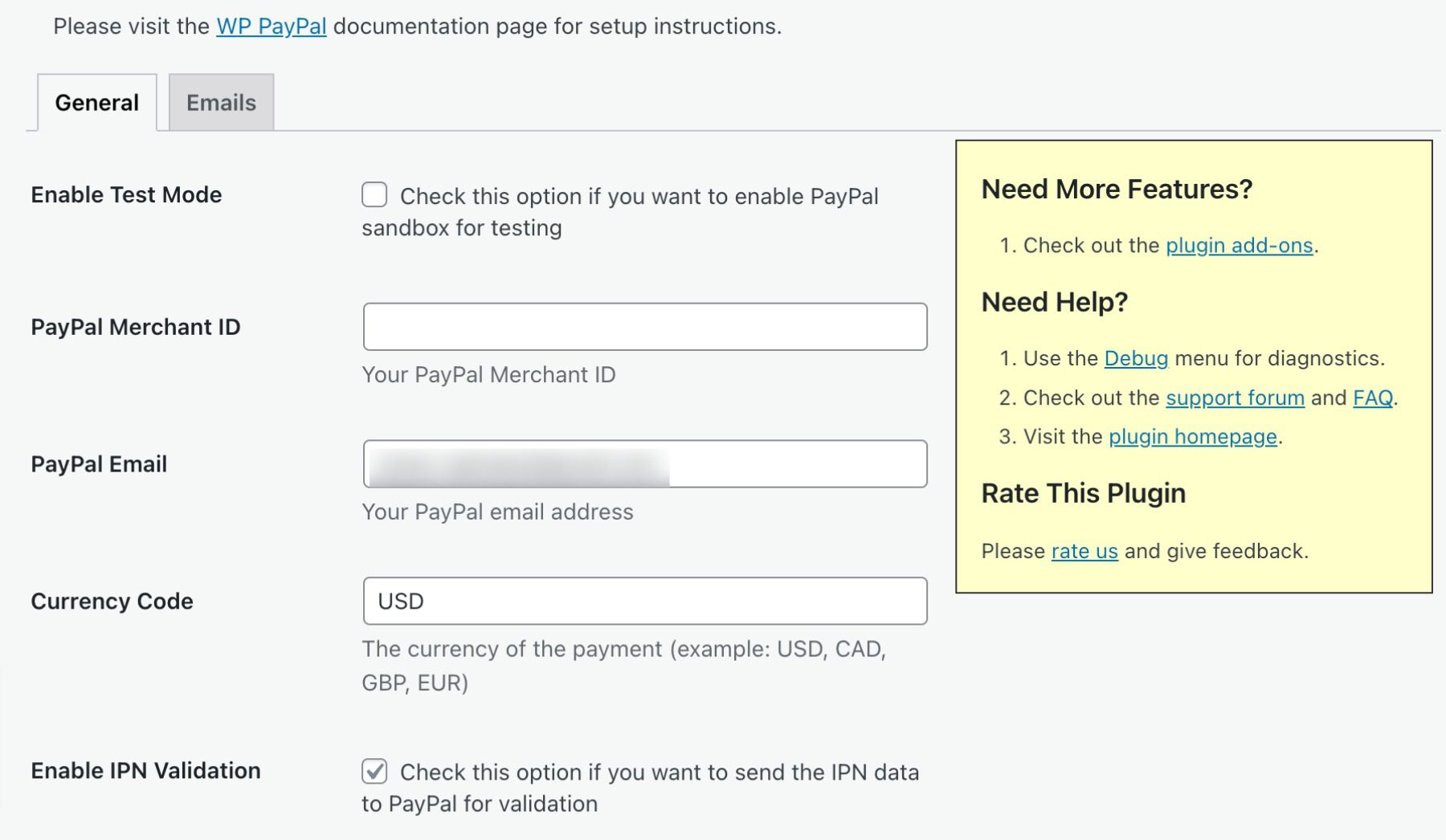
    With the Payment Button for PayPal, you can add a secure payment button to your website with one simple shortcode. This button lets you accept credit card, debit card, and PayPal payments from any mobile device, tablet, or PC. The plugin also includes a built-in IPN (Instant Payment Notification) system that notifies you when payments are made and allow you to track your sales.

    Best For:

    Payment Button for PayPal is an ideal solution for individuals looking for a hassle-free way to accept payments on their website without the need to set up a complicated e-commerce platform. However, if you require more advanced e-commerce features, we suggest WPForms.

    Pricing: Free, with premium add-ons.

    Get Payment Button for PayPal

    What is the Best Payment Plugin For WordPress?

    PluginPriceFree Option
    🥇WPForms$199.50 per year✔️Visit
    🥈MemberPress$179.00 per year❌Visit
    🥉Easy Digital Forms$99.50 per year❌Visit
    4GiveWP$149.00 per year✔️Visit
    5WP Simple Pay$99.00 per year❌Visit
    6Quick Paypal Payments$14.99 per year✔️Visit
    7WordPress Simple Shopping CartFree✔️Visit
    8Stripe Payments Plugin for WooCommerceFree✔️Visit
    9Payment Button for PayPalFree✔️Visit

    When it comes to choosing the best payment plugin for your WordPress site, there are a lot of options available. However, two plugins that stand out from the rest are WPForms and MemberPress.

    WPForms offers a user-friendly interface, customizable payment forms, and integration with popular payment gateways such as PayPal and Stripe. On the other hand,

    MemberPress offers robust membership features, content access control, and seamless integration with payment gateways.

    Both plugins provide excellent support and have a strong track record of positive user reviews. Ultimately, the best payment plugin for your needs will depend on your specific requirements and budget, so be sure to think about what your needs are before making a choice.

    Need more plugins? Check out our article featuring the best WordPress schema plugins.

    Featured Image via tanahairstudio / shutterstock.com

    The post 9 Best Payment Plugins for WordPress in 2023 appeared first on Elegant Themes Blog.

    Go to source

  • 7 Best WordPress Multisite Plugins in 2023

    Thanks to WordPress’ multisite option, you can create a network of sites using a single WordPress installation. It’s a fantastic feature that powers some of the biggest sites in the world, including WordPress.com, Reuters blogs, and BBC America.

    In this article, we’ll introduce you to some of the best WordPress multisite plugins that you can use to take your network to the next level. Let’s get to it!

    What are the Benefits of a WordPress Multisite Plugin?

    Multisite plugins offer numerous benefits, with centralized management being one of the most significant advantages. By installing plugins that simplify your workflow, you can manage all your sites effortlessly. For instance, using a cache plugin can be a game-changer since it enables you to flush the cache across all sites at once, eliminating the need to repeat the process per site.

    Another example is a Google Analytics plugin that works seamlessly with multisite environments, allowing you to monitor all your site’s pages in one place. Lastly, user role plugins make it possible to establish specific roles across the network, which saves you time and effort. Overall, multisite plugins can help you streamline your workflow and achieve better management of your WordPress sites.

    7 Best WordPress Multisite Plugins

    As we curated this list of top multisite plugins, we had a few key considerations in mind. Foremost, we prioritized compatibility, only featuring plugins that not only work with WordPress multisite but excel at it. Moreover, we weighed up reviews, number of installs, support, and ease of use, recognizing that you need plugins that simplify your workflow, not complicate it. So, without further ado, let’s dive into our top picks.

    1. Monster Insights

    Monster Insights is one of the best analytics plugins for WordPress. It’s especially effective in a multisite environment. You’ll have easy access to reporting for all subsites in one convenient location, allowing you to monitor each site’s performance collectively.

    Monster Insights dashboard

    Another key feature is the ease of use. With the easy setup wizard, you’ll have your Google Analytics properties set up within a matter of minutes. Once the setup is complete, you can create customized dashboards for each of your sites, so you can choose the most important metrics to track.

    Additionally, Monster Insights allows you to set up role-based access, so you can control who can access your analytics data on a site-by-site basis. Lastly, it offers the best tracking capabilities of any GA plugin including enhanced e-commerce tracking, form conversion tracking, landing page redirect tracking, and file download tracking. This allows you to gain deeper insights into user behavior on your sites, so you can optimize your content accordingly.

    Key Features for MonsterInsights:

    • Easy setup wizard
    • Centralized analytics
    • Customizable dashboards on a site-by-site basis
    • Role-based access
    • Advanced tracking metrics

    Monster Insights is for you if…

    …you want both simplicity and advanced features for tracking Google Analytics on your multisite environment. With Monster Insights’s ease of use and incredible tracking features, it’s a great addition to your WordPress multisite network.

    Price: Free, with premium licenses starting at $99.50 per year.

    Get Monster Insights

    2. WP Activity Log

    WP Activity Log, a WordPress multisite plugin

    This WordPress multisite plugin helps you keep track of everything that happens on your network. WP Activity Log sets up a log that keeps records of events such as new sites on your network when users register, when you change their user roles, when plugins are updated, and much more:

    WP Activity Log example

    It wouldn’t be an exaggeration to say that few things get past WP Activity Log. You can even use it to monitor attempts to log into your website, which can help you figure out if someone is trying to force their way through the WordPress login page.

    Key Features for WP Activity Log:

    • Monitor activity within your multisite network (as well as individual sites)
    • Track almost any event that happens on each website, from plugin activations to new user registrations and logins

    WP Activity Log is for you if…

    …you want to know everything that happens on your network and you don’t mind navigating logs. If you run a multisite network without user registrations or too many sites, you might not need an activity log, but it’s still not a bad idea to have one in place.

    Price: Free, with premium licenses starting at $99 per year.

    Get WP Activity Log

    3. LiteSpeed Cache

    LiteSpeed cache plugin

    Leveraging browser caching is a key step to optimizing WordPress sites. However, not all WordPress caching solutions offer multisite support. LiteSpeed Cache is one of the few plugins that do, and it provides you with a broad range of network-wide options for WordPress optimization.

    With this plugin, you can enable browser caching across your entire network with a click. LiteSpeed Cache also lets you configure the cache to purge when you update plugins, themes, or WordPress itself across the network.

    You’ll also get access to a variety of other useful features. That includes tools to “clean” each site’s database within your network:

    LiteSpeed database optimizer

    You can also use the plugin to automatically convert images to the .webp format as you upload them, which can help lower loading times even further. However, not all browsers are compatible with .webp, so we recommend using that setting on a site-by-site basis.

    Key Features for LiteSpeed Cache:

    • Enable caching for all the sites in your network
    • Configure cache purging options for your multisite network
    • Convert new images to the .webp format after uploading them
    • Clean the databases for each site in your network

    LiteSpeed Cache is for you if…

    …you want to enable browser caching across your multisite network using a plugin. You can also do so manually, but that means configuring settings for each site individually.

    Price: Free

    Get LiteSpeed Cache

    4. User Role Editor

    The User Role Editor plugin

    Custom user roles play a significant role in many WordPress websites. If you have one site on your network that serves as a store and another designed for blogging, you’re going to want different user roles for each project. Entering each site to manage individual roles can take up a lot of time, however, particularly as your user base grows.

    With User Role Editor, you can create custom roles and tweak permissions and capabilities for existing ones. This plugin also enables you to configure the default roles for new users across the entire network:

    Setting a default user role for a multisite network

    If you use the premium version of User Role Editor, you’ll be able to edit user roles for the network from your multisite admin dashboard. You can also export and import user roles from one website to another within the network.

    Key Features for User Role Editor:

    • Add custom user roles to your WordPress installations
    • Tweak the permissions and capabilities for existing user roles
    • Set a default user role for sites within the multisite network
    • Edit user roles across the entire network
    • Import and export user data across websites

    User Role Editor is for you if…

    …your multisite network includes a broad variety of website types, and you’re looking to use a wide range of user roles.

    Price: Free, with premium licenses starting at $29 per year.

    Get User Role Editor

    5. User Switching

    The User Switching plugin

    User Switching can be a lifesaver if you have a lot of registered users across multiple websites. With this plugin, you’ll be able to switch to other user accounts with a single click of a button from the Users tab in your dashboard. The plugin works with multisite, which means you can use it to switch to user accounts throughout your entire network from the admin area.

    This plugin can help immensely when it comes to troubleshooting errors for specific users. You can also switch to other accounts to test new features on your website, and make sure everything is working correctly.

    It’s worth noting that only administrators or super administrators have the option to switch to other user accounts. This plugin lets you change back to your original account at any time, and it doesn’t reveal passwords (so it doesn’t interfere with users’ privacy).

    Key Features for User Switching:

    • Switch to other user accounts within your multisite network
    • Only enable administrators or super administrators to access other user accounts

    User Switching is for you if…

    …you want to troubleshoot errors or bugs across your entire multisite network. In many cases, errors will only appear for specific user roles, which makes User Switching an invaluable tool. You can also use this WordPress multisite plugin to determine whether specific features are working correctly on one of your sites.

    Price: Free

    Get User Switching

    6. Multisite Language Switcher

    Multisite Language Switcher, a WordPress multisite plugin

    If you want to run a multisite network that includes multilingual websites, Multisite Language Switcher will come in handy. This WordPress multisite plugin enables you to set default front-end and admin languages for each site. You can also display a language switcher widget or block that visitors can use if the content they’re seeing is available in more than one language.

    Keep in mind that you’ll need to translate content on your own for the language switcher to work. Moreover, the plugin doesn’t offer configuration options within the multisite admin area. Instead, you can decide which languages to use and how to display the switcher on a site-by-site basis.

    Key Features for Multisite Language Switcher:

    • Enable multilingual support for all the sites within your network
    • Add a language switcher to each website using blocks or widgets
    • Set default font and admin languages for each website
    • Create different versions of each page or post in multiple languages

    Multisite Language Switcher is for you if…

    …you want to add multilingual support for all of the sites in your network. The plugin is also perfect if you want to use different languages for each site, as it gives you full control over each project’s settings.

    Price: Free

    Get Multisite Language Switcher

    7. All-in-One WP Migration

    All-in-One WP Migration, a WordPress multisite plugin

    Let’s start by saying that there are no free options when it comes to migrating multisite networks with plugins. You can always migrate a network or export individual sites manually. However, WordPress migration plugins such as All-in-One WP Migration only offer multisite support as a paid add-on.

    With All-in-One WP Migration’s multisite extension, you’ll be able to move your network from one web host to another. The plugin also lets you export individual or multiple sites in one go. The same system can be used to import sites from one network to another.

    All-in-One WP Migration also includes a cloning feature that lets you duplicate sites within a network, which can come in handy for staging purposes. If you use that extension as part of a network, it offers support for unlimited sites.

    Key Features for All-in-One WP Migration:

    • Migrate multisite networks from one web host to another
    • Import and export individual or multiple sites from a network
    • Clone websites within a network

    All-in-One WP Migration is for you if…

    …you don’t want to migrate your network manually, and your new web hosting provider doesn’t offer that service. If you need to use a migration plugin for multisite networks, this is the best option available.

    Price: Free, with premium licenses starting at $319 per year.

    Get All-in-One WP Migration

    Which WordPress Multisite Plugin is The Best?

    WordPress multisite already offers a powerful toolset on its own. Using it, you’ll be able to set up an entire network of websites with just a single WordPress installation. However, running a lot of sites at once brings its own set of challenges, which is where WordPress multisite plugins come in.

    PluginPriceFree Option
    🥇Monster InsightsFree, 99.50 per year✔️Visit
    🥈WP Activity LogFree, $99 per year✔️Visit
    🥉LiteSpeed CacheFree✔️Visit
    4User Role EditorFree, $29 per year✔️Visit
    5User SwitchingFree✔️Visit
    6Multisite Language SwitcherFree✔️Visit
    7All-in-One WP MigrationFree, $319 per year✔️Visit

    Monster Insights and WP Activity Log are two of the best WordPress multisite plugins due to their exceptional features and functionality. Monster Insights offers a robust analytics platform that delivers deep insights into your audience’s behavior, allowing you to optimize your sites accordingly. It’s easy to set up and use, making it an ideal solution for beginners and experts alike.

    On the other hand, WP Activity Log offers a comprehensive suite of site activity monitoring tools, including user role management, file changes, and site-wide activity tracking. This plugin provides an unparalleled level of control over your multisite network, ensuring that all changes are tracked and logged in real-time. Overall, both plugins are highly effective, and user-friendly, and offer a range of features that can help streamline your management process and improve your site’s performance.

    Do you have any questions about how to manage a WordPress multisite network? Let’s talk about them in the comments section below!

    Featured image illustration via filborg / shutterstock.com

    The post 7 Best WordPress Multisite Plugins in 2023 appeared first on Elegant Themes Blog.

    Go to source

  • 5 Best RSVP Plugins for WordPress Websites in 2023

    Event planning requires a massive amount of work, and managing the guest list is no small part of that. Fortunately, unlike dealing with catering or hiring a DJ, keeping track of RSVPs is a process you can automate with the right WordPress plugin.

    In this article, we’ll first discuss some use cases for WordPress RSVP plugins. Then we’ll introduce you to our top picks and help you choose the right one for your website.

    Let’s get to it!

    Subscribe To Our Youtube Channel

    Why You May Need a WordPress RSVP Plugin

    RSVPing for an event is easy. In most cases, it will only take you a few minutes to do so. However, if you’re the one managing responses and following up with guests who haven’t sent in their replies, that is a whole different issue.

    If you’re in charge of planning any kind of big event – such as a wedding, conference, business seminar, fundraiser, or even a concert – following up with RSVPs for hundreds of guests takes time. Fortunately, you can automate the process by using the right plugins.

    With the right RSVP plugin, you can create a system where people can confirm their plans to attend your event online at their leisure. Depending on which one you use, you may be able to send automatic email reminders, enable attendees to include notes, and even process payments for paid events. Booking plugins, which tend to work best for appointments and 1:1 meetings may be something you need for certain parts of your business, but if you are simply throwing a party, an RSVP plugin is what you’re after.

    5 of the Best RSVP Plugins for WordPress Websites

    Whether you’re creating a wedding RSVP website or organizing a conference, there’s a plugin that’s perfect for the job. Most of the ones we’ve highlighted below focus on event management. However, there are also some you can use to set up simple RSVP forms if you need something that’s a little more flexible.

    All of our top picks receive regular updates and have at least a four-and-a-half-star rating in the WordPress Plugin Directory. We’ve listed them in no particular order.

    1. WP Forms

    WPForms banner

    You’re probably familiar with WP Forms – it’s one of the most popular WordPress form plugins on the market. It’s also an excellent option to implement RSVP functionality.

    The free version of WP Forms doesn’t include RSVP templates. However, you can use its default fields to put together simple forms with checkboxes and ‘yes/no’ options for visitors to confirm their attendance to any type of event.

    If you upgrade to WP Forms Pro, you can also include event maps alongside your forms. Other fields available in the premium version include clickable phone fields, date and time information, and more. These aren’t necessary to set up basic RSVP forms, but they can come in handy if you want to use your website to manage multiple events.

    Compared to Ninja Forms, WP Forms loses a point or two since it doesn’t include RSVP form templates for its free version. However, if you use its premium version, then its extra fields make it a more comprehensive option.

    Key Features:

    • Set up simple forms using a drag-and-drop builder
    • Use ‘yes/no’ and checkbox fields to design a classic RSVP form
    • Configure notifications for new form submissions
    • Include a venue map with your form (premium version)

    Price: Free with a premium option available

    Get WP Forms

    2. Registrations for The Events Calendar

    The Registration for The Events Calendar add-on

    We’ve reviewed The Events Calendar in the past, which is one of many great WordPress events calendar plugins available today. It’s a plugin that enables you to display a calendar on your website to showcase any number of events you want. You can also share event information, times, venues, and much more.

    Registrations for The Events Calendar is a free add-on that incorporates RSVP functionality into the parent plugin. With this feature, visitors can see a quick glimpse of how many people are already planning to attend an event and sign up by leaving a few personal details.

    The plugin enables you to customize your RSVP forms and automatically sends a confirmation email to attendees, including all the event’s key details. You can use it to create forms for any type of event you want, and it enables you to browse your list of confirmed attendees from your dashboard.

    Key Features:

    • Add RSVP functionality to The Events Calendar
    • Customize your RSVP forms
    • Receive notifications for new signups
    • Browse your lists of attendees at any time

    Price: Free with a premium version available

    Get Registrations for The Events Calendar

    3. RSVP and Event Management Plugin

    The RSVP and Event Management Plugin

    The developer of the RSVP and Event Management Plugin built it with his own wedding in mind, and it shows when you take a look at its features. On top of basic RSVP functionality, it enables guests to add their plus ones as well. It also offers the option to associate with specific guests, so large groups or families can reply all at once.

    The RSVP and Event Management Plugin form is custom-built for weddings, too. It includes options for guests to select their meal choices, including vegetarian and kid’s meals. If you need a straightforward plugin for a wedding RSVP website, this is it.

    Key Features:

    • Set up an RSVP form for weddings (or other events)
    • Inquire about your guests’ dietary requirements
    • Enable attendees to add guests when they RSVP
    • Enable groups to RSVP together
    • Browse your list of attendees from your dashboard

    Price: Free with a premium version available

    Get RSVP and Event Management Plugin

    4. Ninja Forms

    The NInja Forms WordPress plugin.

    Ninja Forms is not precisely an RSVP plugin. It’s a form builder with drag-and-drop functionality. Using it, you can create forms for email signups, collecting feedback, user registration, event RSVPs, and more.

    There are a lot of great WordPress form plugins that offer similar functionality. However, Ninja Forms has an edge when it comes to RSVPs because it provides an events registration template out of the box. Most other form-builder plugins only offer this feature through paid add-ons.

    One downside to using Ninja Forms for collecting RSVPs is that it doesn’t include as many event information and description options as some of the plugins we listed above. If you want to add a calendar or display a venue map, you’ll need a separate tool for that.

    Key Features:

    • Provides an event registration form template
    • Enables you to build custom event registration forms using a broad range of pre-built fields
    • Processes payments for attendees using popular payment gateways

    Price: Free with a premium option available

    Get Ninja Forms

    5. RSVPMaker

    RSVP maker

    RSVPMaker is a lightweight WordPress plugin that specializes in RSVP management. It allows users to create an unlimited number of events, both virtual and in-person, and collect attendee information as desired. Additionally, for events that require payment, RSVPMaker offers the option to accept payments through PayPal or Stripe. Rather than attempting to include every possible feature, the plugin focuses on providing a solid base that can be adapted to meet specific requirements.

    Whether you’re planning a small meeting, a conference, or a fundraising event, RSVPMaker provides a range of customizable features and functionality to help you manage your event planning and registration process.

    Key Features for RSVPMaker:

    • Lightweight and extensible RSVP plugin for WordPress
    • Unlimited creation of virtual or in-person events
    • Attendee registration with customizable data collection
    • Acceptance of payments via PayPal or Stripe for paid events
    • A strong foundation for customization according to user needs
    • Easy-to-use event editor with a range of templates for different types of events.

    One of the key benefits of RSVPMaker is its flexibility and customization options. Users can tailor their event listings, registration forms, and email communications to fit the unique needs of their event and their audience. This can help improve engagement, increase attendance, and streamline the registration and communication process.

    Price: Free

    Get RSVPMaker

    Which One is The Best RSVP Plugin for WordPress?

    Whether you’re planning one big event or you make a living organizing them all year round, setting up a system to help you deal with RSVPs is a brilliant move. A WordPress RSVP plugin can save you significant time and money over contacting each guest or hiring someone to take care of it.

    PluginPriceFree Option
    🥇WP Forms$49.50/yr✔️Visit
    🥈Registrations for The Events Calendar$99.00/yr✔️Visit
    🥉RSVO and Event Management Plugin$99.00/yr✔️Visit
    4Ninja Forms$49.00/yr✔️Visit
    5RSVPMakerFree✔️Visit

    If you want to set up an RSVP website using WordPress, these are our top two choices:

    1. WP Forms: An easy-to-use tool that enables you to quickly build RSVP forms.
    2. Registration for The Events Calendar: Adds RSVP functionality to The Events Calendar.

    Do you have any questions about WordPress RSVP plugins and how to use them? Let’s talk about them in the comments section below!

    Featured image illustration by garagestock / shutterstock.com

    The post 5 Best RSVP Plugins for WordPress Websites in 2023 appeared first on Elegant Themes Blog.

    Go to source

  • 9 Best Facebook Plugins for WordPress in 2023

    Facebook boasts over 2.8 billion monthly active users, which is to say that nearly everyone uses it. By integrating WordPress and Facebook, you can share audiences between your website and social media profiles. The best way to achieve that integration is by using Facebook plugins for WordPress.

    In this article, we’ll introduce you to the nine best Facebook plugins for WordPress, and discuss when to use each of them. Let’s get to it!

    Subscribe To Our Youtube Channel

    Why Do You Need a Facebook Plugin?

    A Facebook plugin can be beneficial for website owners in several ways. It can allow users to easily share content on their Facebook profiles, leave comments using their Facebook accounts, and like or recommend content. Additionally, Facebook plugins can integrate your website with your Facebook page, allowing you to promote your social media content and display your page’s feed on your site. Overall, a Facebook plugin can help increase engagement, visibility, and traffic to your WordPress website.

    9 Best Facebook Plugins for WordPress

    For this roundup, we’re focusing on Facebook plugins that add useful new functionality to your website. There is a mix of free and paid options here, and they’re all regularly updated and have strong reviews. With that in mind, let’s start by talking about feed integration.

    1. Social Post Feed

    The Social Post Feeds plugin

    First up, the Social Post Feed plugin provides you with a simple way to embed Facebook feeds anywhere on your site, as well as in individual posts. You can pull feeds from pages or groups, and the plugin doesn’t limit how many elements you can embed on your website:

    An example of an embedded Facebook feed

    Thanks to this plugin, visitors will be able to like posts within embedded feeds. However, if they want to leave comments, they’ll be redirected to Facebook.

    Social Post Feed also includes a feature that can make your embedded feeds compliant with the General Data Protection Regulation (GDPR). Moreover, since it doesn’t use IFrames for embedding content, search engines will be able to crawl those elements on your website, giving you a boost in SERPs.

    Key Features for Social Post Feed:

    • Displays unlimited posts and feeds
    • Lets you customize the look of embedded content so it matches your site
    • Supports Facebook pages and groups

    Social Post Feed is for you if…
    …You want to add a lot of Facebook content to your website, or you’re trying to ensure GDPR compliance.

    Price: Free, with a premium version starting at $49 per year.

    Get Social Post Feed

    2. Nextend Social Login and Register

    The Nextend Social Login and Register Facebook plugin for WordPress

    Creating a custom login screen is useful for your subscribers and can make your membership website easier to log in to. After all, if you want users to register for your website, you need to make that process as easy as possible. The default WordPress registration system works, but it also forces users to remember yet another set of credentials.

    A fantastic alternative is to enable users to register and log in using their social media accounts. The Nextend Social Login and Register plugin adds that functionality to your website.

    Adding social login functionality to WordPress

    Plus, it integrates with popular membership plugins such as MemberPress and Paid Memberships Pro.

    The free version of the plugin adds support for Facebook, Twitter, and Google registration and logins. Plus, users will be able to use their social media profile pictures on their WordPress accounts.

    Key Features for Nextend Social Login and Register:

    • Enables users to register for and log in to your site using Facebook and other social profiles
    • Connects users’ social accounts to their WordPress accounts
    • Displays users’ social profile pictures as their WordPress account avatars

    Nextend Social Login and Register is for you if…
    …You want to streamline the login process for your users or encourage them to connect their Facebook accounts to your site.

    Price: Free, with the premium version starting at $49 (one-time fee).

    Get Nextend Social Login and Register

    3. 10Web Social Post Feed

    The 10Web Social Post Feed plugin

    Next on our list is 10Web Social Post Feed. This plugin enables you to embed Facebook feeds on your WordPress website, as well as specific publications.

    Example Facebook feed

    One new feature this plugin brings to the table is the ability to add feeds to your website using widgets. With this approach, you can use your Facebook feed as a sidebar without it distracting from the rest of your page’s content.

    The plugin also includes lightbox functionality, multiple feed layout styles, and pre-made templates to choose from for each element. By using 10Web Social Post Feed, you can embed an unlimited number of Facebook feeds on your website.

    Key Features for 10Web Social Post Feed

    • Enables you to display unlimited feeds on your posts and pages
    • Lets you choose what types of content you want to display in your feeds
    • Provides an exceptional amount of customization options

    10Web Social Post Feed is for you if…
    …You want ultimate control over how your Facebook feeds appear.

    Price: Free, with a premium version (in a bundle) starting at $85 for six months.

    Get 10Web Social Post Feed

    4. Social Sharing Plugins – Social Warfare

    Social Warfare Facebook plugin

    Social Warfare is a lightweight, robust social sharing plugin that adds sharing buttons for Facebook, Twitter, Pinterest, LinkedIn, and others. With various placement options, you have the freedom to place social sharing buttons anywhere on your site.

    social warfare placement

    Additionally, users have the option to float the buttons on the page so that buttons follow readers as they advance throughout the page. This makes it easier to share your content with their followers, increasing the likelihood of readership. Additional features include the ability to style how your posts look on social media platforms, with options for thumbnail and text size, custom visual themes, and custom date ranges.

    Key Features for Social Sharing Plugins – Social Warfare:

    • Post display options
    • Multiple placement options
    • Various social media platforms included
    • Click to tweet quotes
    • Shortcode support
    • Content hijacking protection

    Social Sharing Plugins – Social Warfare is for you if…
    …You want to give your site’s visitors the ability to share your content with their followers and need custom post display capabilities.

    Price: Free, with a premium version starting at $29 per year.

    Get WP Social Sharing Plugins – Social Warfare

    5. WP Review Slider

    WP Review Slider plugin

    Social proof is one of the most powerful ways to encourage new visitors to trust your site’s content, service, and product recommendations. If you have a Facebook page for your website that includes ratings, The WP Review Slider plugin enables you to display them in WordPress.

    Serving as both a review plugin and Facebook plugin, this tool can retrieve review data from your Facebook page, import it into WordPress, and display it using a custom slider style. It can also import text-only tweets and display them as part of your carousel:

    WP Review Slider example

    In addition, WP Review Slider lets you customize your slider to show a specific number of reviews, show or hide ratings, display multiple rows, and more. You can even use custom CSS to tweak your review slider’s style.

    The free version of the plugin only works with Facebook page reviews. If you pay for the premium version, you’ll also be able to import reviews from Yelp, TripAdvisor, Google, and many more platforms.

    Key Features for WP Review Slider:

    • Helps you display Facebook reviews and positive tweets on your WordPress site
    • Provides you with a highly-customizable slider feature for showing off reviews and feedback
    • Lets you determine display placement using shortcodes, templates, or widgets

    WP Review Slider is for you if…
    …You want to show off Facebook reviews on your website and get a high level of control over their appearance and placement.

    Price: Free, with a premium version starting at $29 per year.

    GetWP Review Slider

    6. Easy Social Post Feed

    The Easy Social Post Feed plugin

    We already recommended a great Facebook feed plugin for WordPress. However, Easy Social Post Feed is worth looking at as well, since it brings several unique features to the table.

    For one, this plugin doesn’t work with just Facebook, as it also enables you to embed Instagram feeds, making it a good general social media plugin. Plus, it gives you full control over how you display feeds from either social media platform, and includes several built-in “skins” or templates that you can choose from.

    What’s more, Easy Social Post Feed lets you feature a Load More button, which enables visitors to keep scrolling through your feed without leaving your website. However, it’s worth noting that the free version of this tool only enables you to embed a single social media feed at a time.

    Key Features for Easy Social Post Feed:

    • Lets you embed a fully-customizable Facebook feed on your WordPress site
    • Includes a “PopUp” feature so users can view content more closely without leaving your site
    • Enables you to feature Instagram feeds on your website, as well as customize them extensively

    Easy Social Post Feed is for you if…
    …You want to feature both your Facebook and Instagram content on your site and like the idea of an all-in-one solution for the two platforms.

    Price: Free, with a premium version starting at $39 per year.

    Get Easy Social Post Feed

    7. Social Media Share Buttons

    The Social Media Share Buttons plugin

    Enabling users to share your WordPress blog posts via social media is a great way for your content to find new audiences. To implement that feature, you’ll need to use the right Facebook plugin for WordPress.

    With Social Media Share Buttons, you’ll be able to add sharing icons to your website for over 200 platforms, including Facebook, Pinterest, Instagram, Twitter, and more.

    This plugin also includes features that enable you to customize each social media icon’s actions. For example, you can configure your Facebook icons so that instead of sharing content, users will like your page or be redirected to it:

    Modifying your Facebook social media icon functionality

    In addition, you can decide precisely where social media icons will show up on your website, and choose from a broad range of button styles. Keep in mind that if you share blog content on Facebook, you may want to use the platform’s OpenGraph Debugger to ensure that it displays correctly.

    Key Features for Social Media Share Buttons:

    • Lets you add icons for Facebook and many other popular platforms to your site
    • Provides multiple design options for your social icons, and permits custom designs
    • Offers control over where your icons lead and what actions they prompt

    Social Media Share Buttons is for you if…
    …You want to encourage website visitors to share your Facebook content and check out your other social platforms as well.

    Price: Free, with a premium version starting at $29 per year.

    Get Social Media Share Buttons

    8. WP2Social Auto Publish

    The WP2Social Auto Publish Facebook plugin for WordPress

    If you want to run a popular Facebook page for your website, then it needs to be active. That means publishing new content often, and engaging with members so they’ll want to keep checking for new updates.

    The WP2Social Auto Publish plugin enables you to auto-publish the content that you upload to WordPress on Facebook. This means that if you publish a blog post, you can automatically share it on your Facebook page as well, saving you from having to do so manually. What’s more, you can decide what kind of content you want to auto-publish on Facebook and what elements will be ported over to the social media platform.

    Key Features for WP2Social Auto Publish

    • Enables you to automatically publish your blog posts on Facebook
    • Gives you multiple options for how your posts are displayed on the social platform
    • Lets you filter posts based on custom post types and categories

    WP2Social Auto Publish is for you if…
    …You want to grow your Facebook following and get twice the value for your blog content.

    Price: Free, with a premium version starting at $39 per year.

    Get WP2Social Auto Publish

    9. Fancy Facebook Comments

    The Fancy Facebook Comments plugin

    The default WordPress comments system works just fine for many users. However, there are a lot of alternative solutions that add more functionality to your comments section.

    One such tool is the Fancy Facebook Comments plugin. This solution enables you to add a Facebook-powered comments section to your posts and pages. If visitors are logged into Facebook, they’ll be able to leave comments on your website without needing to sign up for an account.

    You get some control over your Facebook comments section’s style as well, including which pages it appears on, what fonts it uses, and more:

    Configuring your Facebook comments section

    Fancy Facebook Comments also works with BuddyPress, BBPress, and WooCommerce, and it’s compatible with multisite setups.

    Key Features for Fancy Facebook Comments:

    • Lets visitors leave comments on your website using their Facebook accounts
    • Enables visitors to easily sort and search comments based on various factors
    • Helps you choose where Facebook comments will be displayed, and integrate them with third-party solutions

    Fancy Facebook Comments is for you if…
    …You’d like to drive engagement on your site without requiring users to sign up for new accounts.

    Price: Free, with a premium version starting at $11.99 per year.

    Get Fancy Facebook Comments

    Final Thoughts on Facebook Plugins

    It shouldn’t come as a surprise there are a lot of fantastic Facebook plugins for WordPress, considering this social media platform’s popularity. A lot of those tools implement similar features, but some solutions provide more unique and must-have functionality. For the top pick, we choose Social Post Feed, primarily due to having the ability to embed multiple Facebook feeds, as well as styling options to match branding.

    PluginPriceFree Option
    🥇Social Post FeedFree, $49 per year✔️Visit
    🥈Nextend Social Login and RegisterFree, $49 one-time fee✔️Visit
    🥉10Web Social Post FeedFree, $85 for six months✔️Visit
    4Social Sharing Plugins – Social WarfareFree, $29 per year✔️Visit
    5WP Review SliderFree, $29 per year✔️Visit
    6Easy Social Post FeedFree, $39 per year✔️Visit
    7Social Media Share ButtonsFree, $29 per year✔️Visit
    8WP2Social Auto PublishFree, $39 per year✔️Visit
    9Fancy Facebook CommentsFree, $11.99 per year✔️Visit

    Whether it’s embedding feeds, social sharing, or even using Facebook’s commenting system, there’s a lot that the tools listed above can offer to your WordPress site. By integrating Facebook with WordPress using these solutions, you can offer a stronger user experience and leverage the platform to grow your website.

    Do you have any questions about Facebook plugins for WordPress? Let’s talk about them in the comments section below!

    Featured image illustration by V3rc4 / shutterstock.com

    The post 9 Best Facebook Plugins for WordPress in 2023 appeared first on Elegant Themes Blog.

    Go to source